
How to Register at Jhingalala in India
Signing up at Jhingalala takes a few minutes, but one field stops many Indian players: the Agent / Referral Code. This guide walks through the form field by field, shows where the code goes, and explains KYC, common errors and what to know about payments in India before your first ₹ deposit.
Partner site, not the operator — we may earn a commission. 18+.
Step by step
The Jhingalala sign-up form, field by field
The form is short; fill in the fields marked as required, including the agent code. Follow these steps in order:
- Open the sign-up formTap Sign Up on this page. It takes you to Jhingalala, where the registration form opens.
- Choose a usernameType a username of 3–30 characters. Only letters, numbers and the underscore are accepted.
- Enter your name, email and phoneWrite your real full name (it must match your ID at KYC), then a working email address and your mobile number.
- Set a passwordPick a password of at least 6 characters and type it again in the Confirm field.
- Add the Agent / Referral CodeThe field is required. Copy the code from the box on this page and type it exactly.
- Answer the security questionSolve the short question, for example a simple sum. It is valid for 5 minutes and can be used only once.
- Create the accountPress Create Account. Your username is now your Jhingalala ID for login.
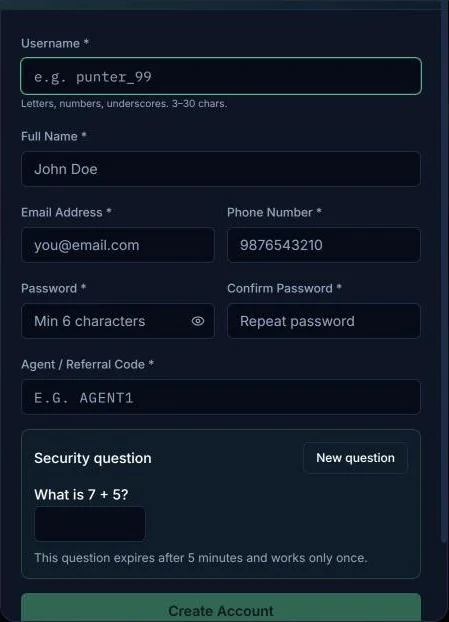
Use your own email and phone, and do not reuse your bank password.
The agent / referral code: what it is and where to enter it
On Jhingalala’s form the Agent / Referral Code field is required. It tells the operator who referred you; without it, no account is created.
Where to get it: the code box on this page. Copy it exactly into the field. If the box says the code is still being added, come back before you register. The grey example text in the field is not a working code.
Never pay for a code or send money to an «agent» with a personal UPI ID — that is a scam.
For more on codes and what Jhingalala offers instead of promotions, see our referral code page.
Get your Jhingalala ID
Indian exchanges call the account an «ID». At Jhingalala, your username is your Jhingalala ID for signing in on any device.
After Create Account you can log in to Jhingalala and see Deposit, My Bets and Account. On a phone you can install the app from the browser; there is no APK.
KYC: on request, before withdrawals
Jhingalala does not ask for documents at sign-up. Its terms say KYC is done on request, usually when you ask for a withdrawal. Expect to show an ID; your details must match the account, or the payout can be held up.
Withdrawals are listed as taking 1–5 working days.
Common registration errors and fixes
| Error | Why it happens | What to do |
|---|---|---|
| No agent code | The required Agent / Referral Code field is empty or the code is mistyped. | Copy the code from the box on this page; check for spaces. |
| Security question expired | The question is valid for 5 minutes and only once. | Reload the form and answer the new question straight away. |
| Duplicate account | The username, email or phone is already in use. | Do not open a second account. Log in or reset your password. |
Your first ₹ deposit: what to know first
Jhingalala lists these payment methods in its footer, with the slogan «Deposit Now! Instant Cashouts!»:
- UPI
- Paytm
- Net Banking
- Bank Transfer
- Visa
- Mastercard
- Skrill
- Neteller
There is no welcome bonus, so deposit only what you can afford to lose. See codes and bonuses for what exists instead.
Minimum age: 18+
You must be 18 or older to register. Enter your real details; they must match your ID if KYC is requested.
Play responsibly from day one
Set a monthly limit before the first deposit and stick to it. Never chase losses or borrow to play. If gambling worries you or someone close, call Tele-MANAS on 14416 or 1-800-891-4416 — free and open 24/7.
New here? Start on the Jhingalala India guide home page.
Jhingalala registration FAQ
What do I need to register at Jhingalala?
You need a username of 3–30 characters (letters, numbers or underscore), your real full name (it must match your ID at KYC), an email address, a phone number, a password of at least 6 characters typed twice, and the Agent / Referral Code. The form also asks one short security question before Create Account. You must be 18 or older.
What is the agent / referral code?
It is a short code that links your new account to the agent or partner who referred you. You type it into the required Agent / Referral Code field of Jhingalala’s sign-up form, after the password fields. Copy it from the box on this page exactly as shown.
Do I need KYC?
Not to open the account. Jhingalala’s terms say KYC is done on request, usually before a withdrawal. You may be asked for an ID document, and your details must match what you entered at sign-up.
What is the minimum age?
You must be at least 18 years old to create a Jhingalala account. Enter your real details; they must match your ID if KYC is requested.