
Jhingalala App for Indian Players
There is no Jhingalala app in Google Play or the App Store. What Indian players get instead is a web app: you add Jhingalala to your home screen from Chrome or Safari, and it opens like an app with the exchange, Teen Patti, Rummy, poker and the casino. Here is how to install it, what works and what to avoid.
Partner site, not the operator — we may earn a commission. 18+.
What it is
A web app, not a native app
The Jhingalala app is a PWA, a progressive web app. The operator’s site offers «Install App» or «Add to Home Screen», and your phone saves it as an icon. Tap the icon and it usually opens like an app, depending on your browser. It feels like an app, but it is the same site.
There is no Jhingalala listing in Google Play or the App Store, and no APK. So «jhingalala app download» has one honest answer: you add the site to your home screen, and that is the whole app. It takes almost no space and updates itself, but it needs internet, and if your network blocks the site, the icon is blocked too.
Step by step
How to install the Jhingalala app
- Open the operator’s siteType jhingalala.com in Chrome on Android or Safari on iPhone. Do not use links from chats, ads or other sites.
- Android: install from ChromeIn Chrome, tap «Install App» on the site or open the Chrome menu and choose Install app or Add to Home Screen, then confirm.
- iPhone: add from SafariIn Safari, tap the Share button, scroll down, choose Add to Home Screen and tap Add.
- Open the iconFind the new Jhingalala icon on your home screen and tap it. It usually opens like an app, depending on your browser.
- Log inSign in with your username and password. No account yet? Register first with the required Agent / Referral Code.
No account yet? Register with the agent code first: the Agent / Referral Code is a required field on the sign-up form.
Android
Install the Jhingalala app on Android
Use Google Chrome and type jhingalala.com yourself. Tap the site’s «Install App» prompt, or open the Chrome menu and choose Install app or Add to Home Screen, then confirm. The icon appears on your home screen.
If you opened the link inside a chat or social app, the Install option may be missing. Copy the address into Chrome instead.
iPhone
Add Jhingalala to the iPhone home screen
Use Safari. Open jhingalala.com, tap the Share button, scroll down, tap Add to Home Screen, then Add. There is no Jhingalala app in the App Store, so anything under that name there is not from the operator.
Inside the app
What works in the Jhingalala app
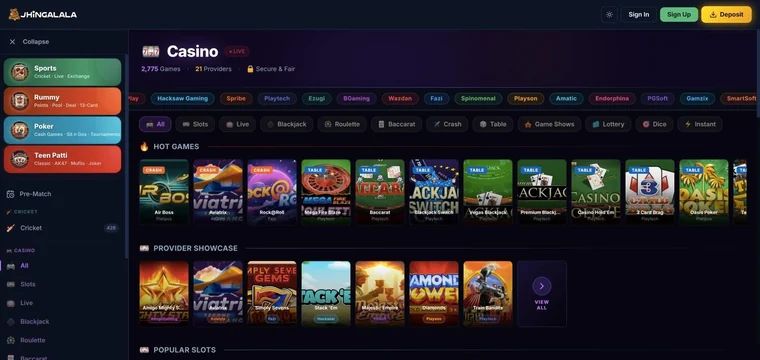
The web app is the same site, so everything in the browser works on the icon too:
- Sports exchange: cricket back and lay, Fancy and Session markets.
- Teen Patti: Classic, Jhandu, Muflis, Joker and more, from ₹10 boot.
- Rummy: Points, Pool 101/201, Deal, Private tables and tournaments.
- Poker: NLH, PLO4 to PLO7, Sit n Go and tournaments.
- Casino: 2,775 games from 21 providers, including crash games.
- Cashier and account: Deposit, My Bets, Account and the light or dark theme.
For password reset and login errors, see the Jhingalala login guide.
Stay away
No Jhingalala APK: a warning
Jhingalala does not publish an APK. Other sites may still offer «Jhingalala APK» files or «mod» versions. Never install them: such files can hide malware, read your SMS codes or show a fake login screen. If Android asks to allow installs from unknown sources, stop. An «agent» who asks you to pay into a personal UPI ID is a scam.
Play safe
Using the app safely
Add the app only from the operator’s own site, jhingalala.com. Never type your Jhingalala password on any other site, including this guide. Lock your phone with a PIN or fingerprint so nobody else can reach your account.
Set a budget before you play. If it stops being fun, call Tele-MANAS on 14416 (free, 24/7).
Under the Promotion and Regulation of Online Gaming Act, 2025 the site can be blocked and payments refused; the app does not change that, and we suggest no way around it. More in the Jhingalala India guide.
Next steps
Installed the icon? Log in to Jhingalala. Curious about promo offers? See the referral code page. For the cricket exchange, Teen Patti and Rummy, go back to the Jhingalala India guide.
Jhingalala app FAQ
Is there a Jhingalala app?
Yes, but not in the usual sense. Jhingalala offers a web app (PWA): you use «Install App» or «Add to Home Screen» on its own site and an icon appears on your phone. It is not a native app from Google Play or the App Store. It opens the same site as your browser does, in its own window.
Do I need an APK?
No. There is no APK for Jhingalala. On Android you add the web app from Chrome, on iPhone from Safari. Any file called «Jhingalala APK» on another site is not from the operator and can carry malware or steal your password. Do not install it.
Does the app have all games?
Yes. The app opens the same site, so you get the same five sections as in the browser: the sports exchange with cricket, Teen Patti, Rummy, poker and the casino lobby, plus the cashier and your account. Tables and games change over time, so check what is open when you play.
Is it safe?
Only add the app from the operator’s own site, jhingalala.com, never from a link in a chat or an ad. Lock your phone and never share your password. Keep in mind that Jhingalala is an offshore operator with no Indian licence, so payments can be declined and the site can be blocked in India.